How to Create a Desktop Shortcut to a Website

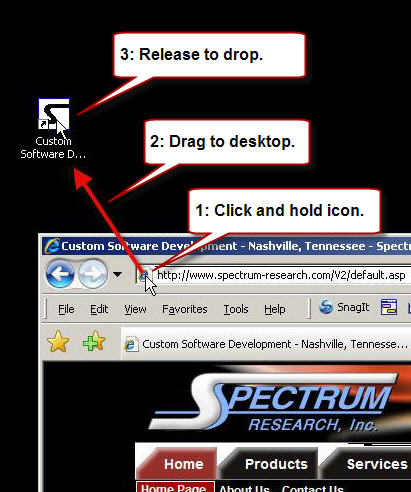
The easiest way to save a website shortcut to your Microsoft Windows desktop is to simply go to the website and drag the icon to the left of the URL onto the desktop. The image below shows how it's done.


Spectrum TimeClock Spectrum Research
Time Clock Software


Topics


General Information

Spectrum Research, Inc.
Export to Excel
Save a Website Shortcut
Time Clock Punching Options

Configuration

Forgot Password Function
Holiday Pay Setup
Time Clock Rounding

Running Payroll

Run a Payroll Batch
View a Payroll Batch
Run a Quick Payroll Report

Employee Management

Delete / Deactivate Employees
Reactivate Employees

Punching IN / OUT

Employee Forgot Punch In
Employee Forgot Punch Out

Other Support.

Request Remote Assistance
TRACERT diagnostic

DOL Regulations

How to Calculate Overtime
Overtime Averaging
Fixed Salary for Fluctuating Hours
Weighted Average Regular Rate

All contents are
Copyright © 2004-2011
Spectrum Research, Inc.
and may not be reproduced without permission.