
Web Based Time Clock SoftwareSpectrum TimeClock™ is our Web Based Time Clock Software solution. It works fast and reliably over the internet from web browsers running on PC workstations, as well as tablets and smart phones like iPhones, iPads, and Android based devices. It is available for a low monthly, quarterly or annual fee. Biometric options are available.
Using Spectrum TimeClock can be a superior, more cost effective option than running a time clock program from your own computer or servers.
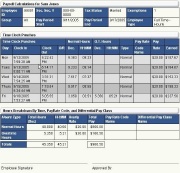
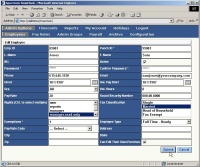
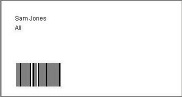
Track Employee Time Spent on a Job - Time Tracking SoftwareEmployers using the Pay Rate / Job Code features built into the software can run reports to find out how many hours one or more employees working on a particular job took. This is great for tracking contract work for client billing! Cut Time Calculation, Time Conversion, & Time Rounding Error CostsSpectrum TimeClock lets you replace employee time clocks and time cards with web based time cards, to accurately track employee time and attendance on any of the network workstations you designate. Managing time and attendance for employees in different locations and even different time zones is now easy and accurate. Calculating time cards can be a costly headache for companies of any size. Based on American Payroll Association savings estimates, companies with 50 employees could save more than $2,500 from paid time saved by payroll personnel. Another $50,000 per year could be saved through the elimination of payroll errors due to time rounding, time calculation, time conversion, and data transposition errors. Try our Return On Investment Calculator to find out how much Spectrum TimeClock could benefit your organization. Easy to Learn and UseSpectrum TimeClock is intuitive to use. Employees punch in or out by simply entering their assigned Punch-ID and pressing a Clock In / Clock Out button. Functions are divided up into basic categories like "Admin", "TimeCards", "Reports", etc. Managers have addition screens where they can manage their direct employees. One large customer was able to train 17 managers in less than 10 minutes. Administrators love its rich selection of reports, management and security features. Ideal for Firms with Multiple Locations or Remote ManagementSpectrum TimeClock is great for firms that have multiple locations, running from one or more time zones and need a multiple time zone clock, or those with employees working from their homes. Security options allow the system to block time clock punching from unauthorized devices or web browsers without preventing manager or administrator logins. System SecuritySpectrum TimeClock has multiple user security levels to control access to all application screens. Administrators have full access to every screen and can add/edit/delete punches. Managers have more limited access and can add/edit punches. Employees have minimal access and can't edit their own time card data unless you enable that for them. You define which web browsers and computers can be punch clock stations using any of several configurable techniques including IPSEC (IP Security) for IP Time Clock control, network routing, or flagged computers. Employees can't punch in from home unless you want them to. Biometric Fingerprint Reader SupportBiometric fingerprint devices can prevent "buddy punching", where one employee punches in or out for another employee. Spectrum TimeClock supports the SecuGen® Hamster™ Plus fingerprint reader via our BioNetick™ Module. Multiple employees can punch in from one or more fingerprint time clock workstations. Bar-coded Employee Badge SupportYou can also use Spectrum TimeClock with our Code39 Barcode Label Software to create bar-coded employee id badges that can be used for barcode time and attendance punches. The barcode generator is included at no additional charge in our hosted accounts. Employee badges with barcodes can be read into Spectrum TimeClock using USB keyboard wedge barcode scanners. When Spectrum TimeClock is in biometric time clock or barcode time clock mode, the keyboard can not be used as a punch-in device. Built in Messaging / Workplace Communication SystemSpectrum TimeClock has a built in, patent pending, messaging and workplace communication system that understands your company's chain of command. The workplace communication system will let your administrators and managers send verifiable messages to subordinates. Employees can send messages to their immediate superior. All employees can reply to any message sent to them. Handles Complicated Shift, Job and Overtime Pay RulesSpectrum TimeClock calculates all normal and overtime hours for an employee's payroll period, as well as hours for overtime exempt employees. It also supports unusual state overtime regulations like California overtime, double-time, the 7th day rule, and California's four day alternate work week. It also supports unusual overtime regulations like Fixed Salary for Fluctuating Hours / Chinese Overtime, and Colorado overtime. Shift differential pay is supported as a percentage of an employee's base pay rate. Rules can be setup to support overtime payment overrides like for work on weekends. Pay Rate / Job Codes are supported to allow employees to punch in and be paid differently for different tasks or jobs, and the required weighted average regular rate for overtime calculations are also performed. The payroll calculation engine so powerful it allows you to use all of these options and computation formulas at the same time! Flexible Pay Periods and First Day of Week SetupWe don't lock you into our idea of what a pay period should look like. You can configure our time clock software to use any day of the week as the first day of the week for overtime calculation.
If your first day of the week is configured some other day, the overtime calculation engine will look back to that day, regardless of the actual payroll start and end dates specified. All types of payroll periods are supported:
Additionally, for semi-monthly, monthly and other period payroll runs, Spectrum TimeClock knows how to calculate overtime regardless of what day of the week (Monday, Tuesday, Wednesday, etc.) the starting day of the payroll period falls on. Spectrum TimeClock Features
Spectrum TimeClock can do all time and gross pay calculations, but does not calculate federal tax withholding, deductions, fica, or the final pay check total. We recommend 3rd party payroll and accounting services for those functions. Competitive Pricing with No Hidden FeesWe believe that you will find our pricing to be very competitive. You may also be pleasantly surprised to know that there are no hidden fees. We don't charge anything for setup, maintenance, or tech support for our basic service or most of our add-ons. Our optional accrual module does carry additional setup and support fees due its complexity. Request a Free 30 Day TrialIf you would like to evaluate Spectrum TimeClock to see how it might be a good fit for your organization, please request a quote and free trial. Add up to 15 employees to your free trial. If you select Spectrum TimeClock, all of your data will be retained! The trials include everything except for 3rd party payroll data export reports. Now Available
|
|
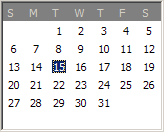 For example, if your first day of week for overtime calculations is Sunday, and your payroll is from Tuesday the
15th until the end of the month, Spectrum TimeClock will look back at Sunday and Monday the 13th and 14th to see if an employee goes
into overtime Tuesday the 15th, through Saturday the 19th - even though Sunday and Monday were paid on the previous payroll run.
For example, if your first day of week for overtime calculations is Sunday, and your payroll is from Tuesday the
15th until the end of the month, Spectrum TimeClock will look back at Sunday and Monday the 13th and 14th to see if an employee goes
into overtime Tuesday the 15th, through Saturday the 19th - even though Sunday and Monday were paid on the previous payroll run.


respective firms, and are not associated with Spectrum Research, Inc.